On set, speed and reliability matter, but one of the biggest drains on both is something most teams don’t actively think about: manual media management. At a glance, copying footage, organizing folders, transcoding, and uploading dailies might seem straightforward. But when these steps are handled manually, often across multiple tools, they introduce friction at every stage of the workflow.
Manual media workflows typically involve multiple disconnected steps. A crew member offloads footage using one application, switches to another tool for transcoding, then manually uploads files to a delivery platform like LucidLink or Frame.io. Along the way, folder structures are created by hand, files are renamed inconsistently, and uploads rely on someone remembering to start them.
Each individual step works. But together, they create a fragile system.
Where the Hidden Costs Add Up
The real issue with manual workflows isn’t just time. Every manual step adds to the mental load. Every tool switch slows the process. Every repeated action increases the chance of human error.
Common issues include:
- Missed uploads to cloud platforms
- Inconsistent file naming and folder structures
- Delays in generating proxies for edit
- Lack of reliable reporting or transfer logs
These are not rare edge cases, but are common across productions, especially on smaller crews where media management is just one of many responsibilities. Over the course of a shoot, these inefficiencies compound into lost time, inconsistent deliverables, and unnecessary stress.
How Automation Eliminates These Problems
Automation changes the equation by removing repetition and standardizing the workflow. With ShotPut Studio, teams can build a complete media workflow ahead of time. This includes:
- Offload and checksum verification
- Automated folder structure creation
- File renaming rules
- Transcoding for proxies or edit formats
- Delivery to cloud or local destinations
- Reporting and logs
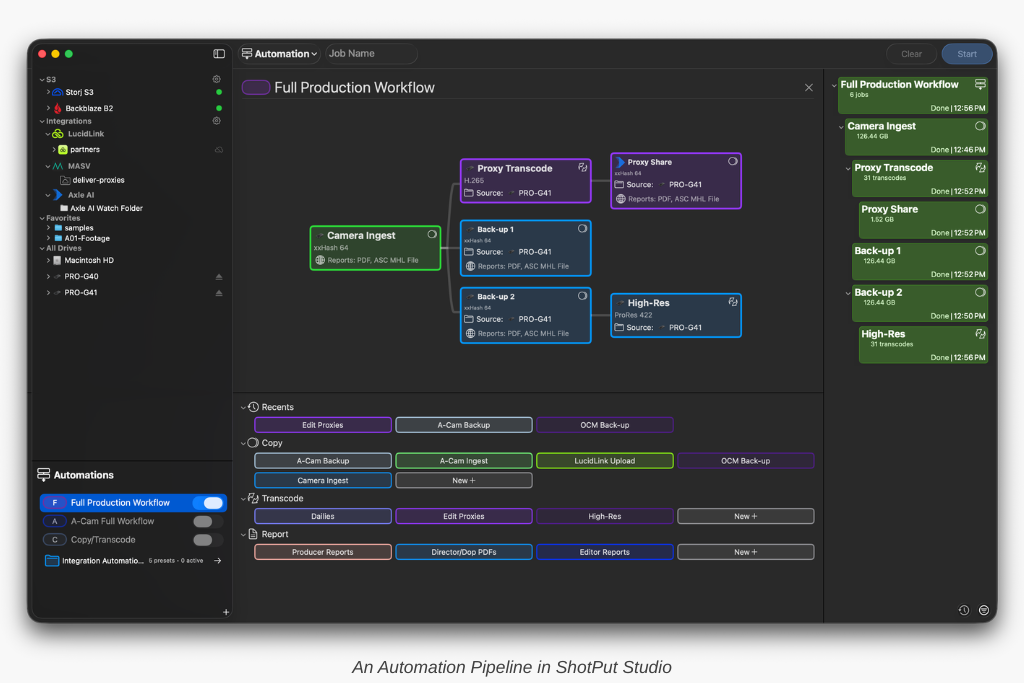
Once configured, the workflow runs automatically. It can be triggered manually or set to begin as soon as a card or drive is connected. Instead of actively managing each step, the operator oversees the process.
Why This Matters for Modern Productions
Automation is especially valuable for smaller teams. When an AC or camera operator is responsible for data, there is less room for error and less time to manage multiple tools.
A fully automated media workflow ensures:
- Consistency across every job
- Reliable delivery of all required files
- Reduced workload during critical shooting moments
It also makes workflows scalable. Whether handling a single camera or multiple units, the process remains consistent.
FAQ
What is a media workflow in film production?
A media workflow includes all steps required to move footage from camera to post production, including offloading, verification, organization, transcoding, and delivery.
Why are manual workflows risky?
Manual workflows rely on human input at every step, increasing the likelihood of missed tasks, inconsistent organization, and delivery errors.
How does automation improve media management?
Automation standardizes the process, reduces human error, and ensures that all steps from ingest to delivery are completed reliably.